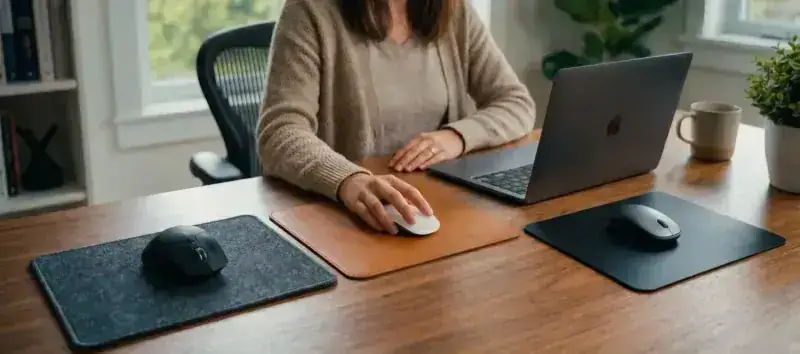
Looking for a remote-work mouse pad and torn between cloth, PU leather and hard surface? The confusion is normal: manufacturers mostly target gamers, not remote workers, and the criteria aren’t the same. A gamer wants maximum glide. A remote worker wants 8-hour comfort, stain resistance, and a look that suits video calls.
This guide compares the three big material families by evaluating them specifically on remote-work criteria, not competitive gaming. If you then want to know which model to actually buy, our best remote-work desk mat selection ranks options by desk profile.
High-density cloth: the versatile remote-work standard
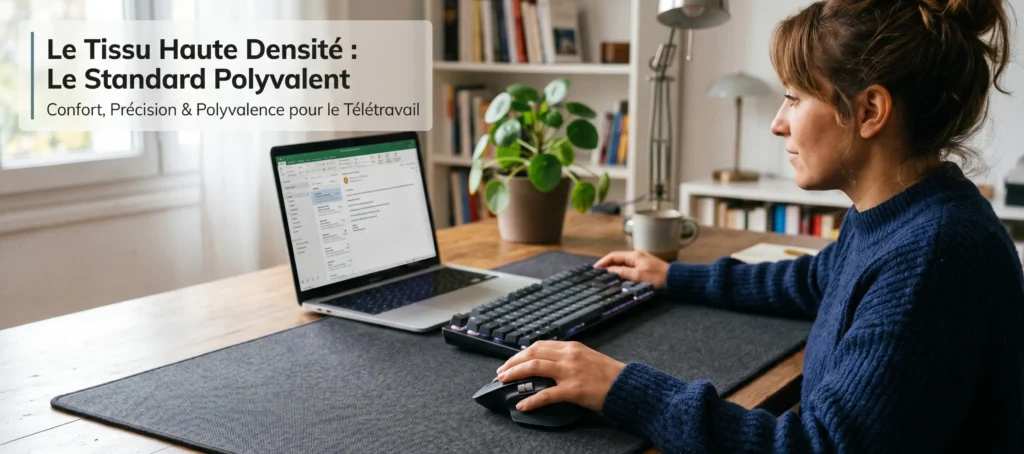
Cloth is, by far, the most-used material for mouse pads and desk mats in professional contexts. Its dominance is no accident: it combines all the advantages of intensive office use with no real deal-breaker weakness.
What cloth offers the remote worker
- Wrist comfort: the soft surface lightly cushions permanent wrist and forearm contact. Over a 7-8 hour typing day, it’s a real difference in muscle fatigue.
- Quiet: keystrokes and mouse movements on cloth are noticeably quieter than on a hard surface. A non-trivial advantage during video meetings or if you share your space.
- Universal compatibility: cloth works with all optical and laser mice, regardless of DPI sensitivity. No special configuration needed.
- Hand-washable: a monthly pass with lukewarm water and mild soap is enough to keep it clean. Our cloth wash guide details every step risk-free.
The limits of cloth in remote work
Cloth accumulates crumbs, dust and fingerprints more easily than a smooth surface. If you regularly eat or drink at your desk, you’ll need slightly more frequent maintenance. On the other hand, models with stitched edges (like all BuddyPad desk mats) hold up well to wear and don’t fray over time.
For remote work, a high-density cloth is preferable to a thin speed cloth: it offers better wrist comfort and longer wear resistance. To understand the technical differences between cloth surface types, our cloth vs hard comparison goes into detail.
Cloth verdict for remote work: recommended for the vast majority of uses. Maximum comfort, simple maintenance, compatible with any setup.
PU leather (faux leather): the premium home-office choice
Synthetic PU leather, sometimes called faux leather or leatherette, is less common in gaming catalogs but very present in remote-work and office ranges from brands like Logitech (Studio Series) or premium accessory makers. Its positioning is clear: high-end aesthetics, minimal maintenance, liquid resistance. If you’re setting up a real home office from A to Z, our guide on home office setup will help you place the desk mat among other priorities.
The advantages of PU leather for remote work
- Stain and liquid resistance: a spilled coffee wipes off in 10 seconds. PU leather doesn’t retain moisture and doesn’t stain on contact with common drinks. It’s its main advantage over cloth.
- Professional appearance: the visual rendering of faux leather is sober and premium. In a room visible during Zoom meetings, it sends a more polished image than a colorful gaming pad.
- Instant cleaning: a damp cloth is enough for daily marks. No deep wash needed.
- High durability: PU leather doesn’t fray and keeps its appearance for a long time, provided you avoid very abrasive surfaces.
The limits of PU leather
PU leather is slightly less comfortable than cloth for direct wrist contact on very long sessions. In hot weather, the surface may slightly stick to the wrist, a minor but perceptible inconvenience. Also, mouse tracking can be slightly less precise than on high-density cloth on very sensitive sensors (above 3,200 DPI), which doesn’t concern remote workers.
PU leather verdict for remote work: excellent if you eat/drink at your desk, if you receive clients on video, or if premium aesthetics is the priority. Slightly below cloth in pure comfort over time.
Hard surface (hard pad): performant but unsuited to remote work
Hard pads (plastic, aluminum, tempered glass) are designed for one thing: offering the fastest, most consistent glide possible for competitive FPS gaming. Razer Atlas, SteelSeries QcK Hard, BenQ Zowie GSR: these are gaming references, not office.
Why hard is rarely the right remote-work choice
- Noise: keystrokes and mouse movements are significantly noisier on a hard surface. In a domestic open space or during video calls, it’s clearly problematic.
- Wrist comfort: no cushioning on a hard surface. Over an intense workday, the absence of soft resistance shows up as wrist fatigue.
- Lack of versatility: large-format desk mat-type hard surfaces are rare. Most models are Standard format (mouse only), not XXL desk.
The only relevant exception in remote work: if you combine evening gaming and daytime work on the same mouse, and you’re used to hard glide, you can stick with your usual gaming surface. But for someone configuring their space exclusively for remote work, hard isn’t recommended.
Hard surface verdict for remote work: not recommended for exclusively office use. Useful only in a mixed gaming/remote context.
Comparison table: cloth vs PU leather vs hard for remote work
| Criterion | Cloth | PU leather | Hard |
|---|---|---|---|
| Wrist comfort (long session) | 5/5 | 4/5 | 2/5 |
| Stain / liquid resistance | 3/5 | 5/5 | 4/5 |
| Sound discretion (typing, mouse) | 5/5 | 4/5 | 2/5 |
| Professional look / video | 4/5 | 5/5 | 3/5 |
| Ease of maintenance | 4/5 | 5/5 | 5/5 |
| XXL desk mat availability | 5/5 | 3/5 | 2/5 |
| Value for money | 5/5 | 4/5 | 3/5 |
Which material to choose by profile?
Choose cloth if…
You’re after the best long-term comfort, you have a standard 100-140 cm desk, your priority is wrist comfort over 7+ hours of daily typing, and you want an XXL format covering the whole work surface. The BuddyPad XXL desk mat collections in high-density cloth cover all these cases at an accessible price. If you want to refine the overall aesthetic, our guide on desk mat and minimalist setup will show you how to create a clean, coherent desk around your desk mat.
Choose PU leather if…
You drink or eat regularly at your desk, premium aesthetics matters to you (video clients, visible desk), or you want cloth-only maintenance with no washing constraints. The Logitech Desk Mat Studio Series and some premium models are good options in this category.
Choose hard if…
You use the same desk to game in the evening and work in the morning, your mouse is configured for fast glide, and you have no acoustic constraint (independent office, no frequent video calls). In this case only, keeping a gaming hard surface can make sense.
To go deeper on the choice between desk mat and classic mouse pad, our desk pad or XXL mouse pad article covers format differences in detail.