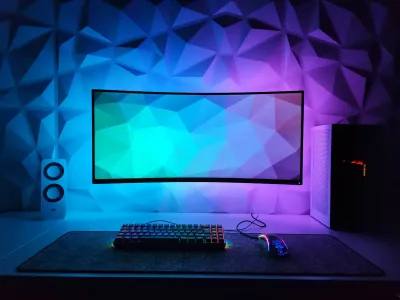
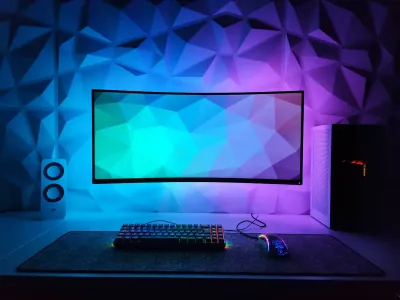
A minimalist setup is not an unlimited budget to buy everything in white or black. It is not a bare desk with nothing left within reach either. It is a simple philosophy: keep only what serves a purpose, and arrange it to reduce visual and cognitive friction.
And in practice, it often performs better than a loaded setup.
Why minimalism improves performance
Environmental psychology is clear on this: a visually cluttered environment raises stress levels and lowers your ability to concentrate. Studies from Princeton University have shown that visual clutter overloads the visual cortex and reduces the brain’s ability to process the main information.
Put in concrete terms: a desk loaded with figurines, cables, unopened packaging and stacked objects wears you down mentally, even when you are not looking directly at them. A clean desk lets your brain devote its resources to what matters - gaming, work, creating.
This is not aesthetics for the sake of aesthetics. It is cognitive performance.
The three rules of a minimalist setup
1. On the desk, only what you use every day
The hardest rule to follow, and the most transformative. Controller, keyboard, mouse, monitor: on the desk. Accessories used once a week: in a drawer. Non-functional decor: keep it to a minimum (one plant, not five).
Every object added to the work surface captures a fraction of your attention. Multiply that by ten or fifteen objects, and the load becomes significant.
2. Cables should not be visible
This is the most rewarding time investment of any setup. Two hours spent organizing cables once and for all visually transform any desk.
Method:
- Adhesive clips along the lower edge of the desk to guide cables downward
- Cable box under the desk to hide the power strip and chargers
- USB hub on the work surface to centralize your frequent connections
- Flat or braided cables for visible equipment
If you use a wired mouse and keyboard, go for braided-cable models in the same color: the visual result is far more cohesive.
3. The color palette is limited
Two or three colors maximum across the whole setup. Black, white and one accent color (natural wood, gray, green, navy). As soon as you mix too many colors, the desk loses its visual cohesion even if every element looks great on its own.
The desk mat: the key accessory of minimalism
In a clean setup, the desk mat plays a structuring role well beyond the glide surface. Laid across the entire active zone of the desk, it visually unifies keyboard, mouse and workspace on a single cohesive surface.
The psychological effect is strong: instead of five objects sitting on a wood/glass/metal surface, you have five objects sitting on one unified surface that visually belong to the same set.
For a minimalist setup, solid-color mats or those with understated patterns work better than busy designs. Our minimalist BuddyPad collections offer models designed precisely for this use: Montagne Noir & Blanc, Feutre de Laine, Simili Cuir - surfaces that fade visually to let the rest of the setup stand out.
Our desk mat and minimalist setup guide digs deeper into the topic with concrete configuration examples.
Choosing your gear on the versatility principle
In a minimalist setup, every object has to earn its place. The test: does this accessory replace several objects or perform several functions?
A USB hub on the desk: replaces three dongles and two direct cables. It earns its place.
A desk mat with built-in wireless charging: replaces the mouse pad + the Qi charger sitting next to it. It earns its place.
An ultrawide or dual monitor: can replace the main monitor + a second monitor on a separate stand. Depending on your use, it can simplify or complicate things.
A compact Bluetooth speaker: replaces an audio system with multiple cables. It earns its place in a minimalist setup.
The goal is not to have fewer features, but to consolidate them into fewer objects.
The minimalist setup paradox: it demands more care
A cluttered setup can hide dust, tangled cables and mess beneath the mass of objects. A clean setup, on the contrary, instantly exposes anything out of place: a fingerprint on the screen, a cable sticking out by a few centimeters, a speck of dust on the desk mat.
Minimalism therefore demands more discipline in daily upkeep. This is not a negative constraint: it is precisely what keeps the setup in its optimal state at all times. Two minutes of tidying a day is enough to keep it spotless.
Where to start
If your current desk is far from minimalism, start with a single action: remove everything from the desk, then put back only what you use every day. What you put back after a few days is what you actually need. What you did not put back - you probably do not need it on the work surface.
Then add the cables, the color palette, and the desk mat in a second step. The order matters: simplify first, decorate afterward.
For a complete home office layout guide, our article on the 5 home office essentials gives you a solid foundation for building a space that lasts.
Frequently asked questions
Is a minimalist setup compatible with competitive gaming?
Yes, completely. Pros and semi-pro players often run very clean setups. Less visual clutter = better focus. Minimalism and performance are not at odds.
How do you handle cables in a minimalist setup?
Cable management is priority number one. Adhesive clips, a cable box under the desk, a USB hub on the work surface, and going wireless whenever you can. One hour invested once is enough for a lasting result.
Do you need a big desk for a minimalist setup?
No. Minimalism works better on a small desk than on a large cluttered one. The goal is to keep only what you use daily on the work surface. Less surface = less temptation to pile things up.