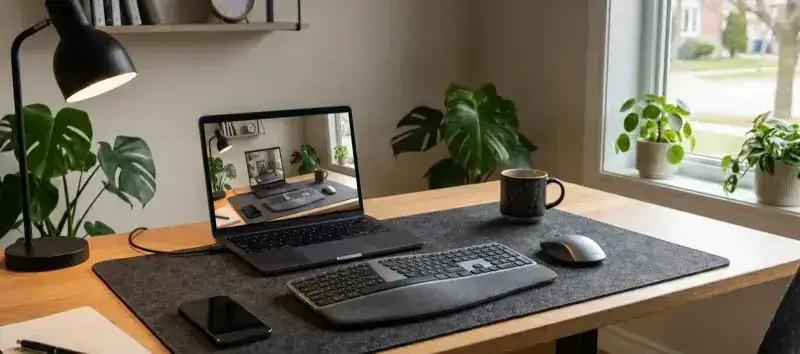
Eight hours a day in front of a screen, hands sliding on a bare wood desk, the keyboard scraping the surface with every keystroke. If you work from home, you know the problem. A deskmat for remote work radically changes the experience: unified surface, relieved wrist, a desk that finally looks like something. You still need to pick the right model.
In 2026, the deskmat market exploded. Between gaming pads recycled into office accessories, premium PU faux-leather deskpads and large patterned cloth formats, the offering is huge - and the bad picks just as many. This guide cuts through.
Remote-work deskmat: what really matters
A remote-work deskmat doesn’t have the same priorities as a gaming pad. Here are the four criteria that really matter for daily professional use.
Size: cover the whole desk without overflowing
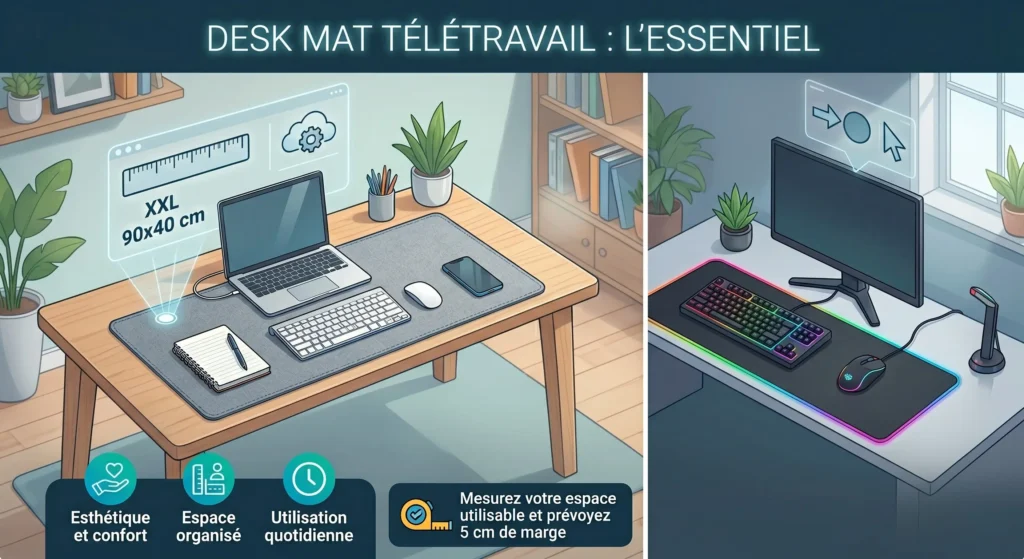
The ideal format for a standard remote-work desk (120 to 140 cm / 47 to 55 in) is the XXL (90x40 cm / 35x16 in). It covers keyboard, mouse, notepad and phone on a single surface, without overflowing the edges. For a more compact desk (100 cm / 40 in), a Large size (80x35 cm / 31x14 in) is plenty.
Unlike gaming, where mouse movement amplitude dictates size, here it’s the aesthetics and comfort of the work zone that guide the choice. Measure your usable space and plan a 5 cm (2 in) margin on each side.
Material: cloth, PU faux-leather or microfiber?
That’s the most important decision. Each material answers a different use:
- High-density cloth: the versatile reference. Comfortable for the wrist during long typing sessions, compatible with every mouse, hand-washable. The choice of 80% of remote workers. Discover our cloth vs hard pad comparison to understand the technical differences. Our dedicated guide on mouse pad materials for remote work (cloth, PU faux-leather and hard) compares the options with the criteria specific to home office.
- Synthetic PU faux-leather: premium look, stain-resistant, wipes clean in 10 seconds. Ideal if you have a coffee at your desk or if you have kids. Slightly less comfortable on very long sessions.
- Microfiber: very soft, silent on keystrokes, pleasant to the touch. Requires regular maintenance because it picks up dust faster.
For pure office use, cloth remains the best compromise. For a desk where aesthetics matter or where spill risks are high, PU faux-leather is more reassuring.
Thickness: the detail that changes long-term comfort
A thickness of 3 to 4 mm is the standard recommended for remote work. It offers enough cushioning for the wrist without creating an offset between the keyboard and the desk surface. 2mm models are too thin for prolonged use; 6mm models tend to bulge under the keyboard.
The non-slip base: what stops the deskmat from sliding
A natural rubber base of at least 2mm density is essential. Avoid models with a thin foam base: they slide on glass or lacquered desks after a few weeks. Stitched edges are also a quality indicator: they prevent fraying and keep the pad flat over time.
Our selection of the best deskmats for remote work in 2026
BuddyPad XXL cloth: the best value-for-money for remote work
The BuddyPad XXL deskmats are designed with a logic that fits remote work perfectly: serious surface quality, exclusive designs for a desk that inspires, and accessible price ($25-40). The high-density cloth surface offers precise mouse tracking while staying soft on the wrist over 8-hour days.
What sets BuddyPad apart for remote work is the variety of available designs. The minimalist collection (Black & White Mountain, Faux-leather, Wool Felt) blends into any professional environment without standing out on a video call. Floral motifs and Japanese designs add a personal touch without visual aggressiveness.
Logitech Desk Mat Studio Series: the clean professional choice
The Logitech Desk Mat (70x30 cm / 28x12 in) is a reference for understated remote work. Splash-resistant cloth surface, discreet design in three neutral colors (dark blue, pink, grey), built-in stain-resistant treatment. Its size is slightly more compact than the BuddyPad XXL, which fits 100-110 cm (40-43 in) desks better. Price: $25-30.
Its main advantage for remote work: the splash-resistant treatment. If you regularly drink coffee or tea at your desk, that feature is worth the price. Our Logitech vs BuddyPad comparison details the technical differences between the two approaches.
Corsair MM350 Pro Extended: for demanding home offices
The Corsair MM350 Pro Extended steps it up with its splash-resistant treatment integrated into the cloth, its comfortable 4mm thickness and its premium rubber base. Available in XL and 3XL (930x400 mm / 37x16 in), the latter format suits large desks of 160 cm / 63 in and up. Price: around $40. A premium choice justified if you have a high-end desk or host clients on video.
Remote-work deskmat by desk profile
The minimalist desk (under 120 cm / 47 in)
For a compact desk, the Large size (80x35 cm / 31x14 in) is enough. Priority on a clean design that doesn’t visually crush the space. Neutral colors (black, charcoal grey, off-white) blend in better. A BuddyPad deskmat from the minimalist collection or the Logitech Desk Mat are both excellent choices for this configuration. If you want to go further in creating a clean and coherent space, our guide on deskmat and minimalist setup breaks down all the elements to combine.
The shared desk (work + gaming)
If your desk is for both work and gaming, the XXL format (90x40 cm / 35x16 in) becomes nearly essential. It covers the whole space, fits keyboard + gaming mouse, and can be customized with a design that matches your universe. The manga and anime collection by BuddyPad or the fantasy designs are particularly suited to this mixed use.
The professional desk (frequent video calls)
If you’re often on video calls and your desk appears in the background, opt for a discreet, photogenic design. A solid dark cloth deskmat or a charcoal PU faux-leather model gives a polished, professional image. Avoid very colorful designs or strongly marked illustrations that could distract your contacts. To set up a complete professional home office beyond just the deskmat, our guide on setting up a home office covers the five essentials needed.
Maintaining your remote-work deskmat: the basics
A remote-work deskmat accumulates fingerprints, crumbs and sometimes drink splashes much faster than a gaming pad used only in the evening. Monthly maintenance is enough to keep the surface and look in good shape.
For cloth models, hand washing in lukewarm water with mild soap does the job. Our complete washing guide explains every step without risk of damaging the pad. For PU faux-leather models, a simple damp cloth handles most stains. Check our general maintenance guide to adapt your routine to your material.
How to choose your remote-work deskmat: the 3 questions to ask
Before buying, three questions are enough to identify the right model:
- What’s the usable width of my desk? Measure the space between your two edges or fixed objects. Pick a deskmat that covers 80-90% of that width.
- Do I regularly eat or drink at my desk? If yes, lean toward a model with splash-resistant treatment or PU faux-leather.
- Is my desk visible on video calls? If yes, pick a discreet or photogenic design that reinforces your professional image.
To go further in choosing by use case, our complete mouse pad choice guide covers all the technical criteria in detail. And if you want to understand the difference between a deskpad and a classic XXL mouse pad, our article deskpad or XXL pad answers exactly that question.
FAQ: Deskmat and remote work
What’s the difference between a deskmat and a classic mouse pad?
A deskmat (or XXL mouse pad) is a large format that covers the whole work zone: keyboard, mouse and accessories all rest on the same surface. A classic mouse pad is smaller and covers only the mouse movement zone. For remote work, the deskmat is almost always preferable.
Can a deskmat replace a desk blotter?
Yes, totally. A cloth or PU faux-leather deskmat plays exactly the same role as a traditional blotter, with the bonus of being optimized for the optical mouse and washable. It also protects the desk surface from scratches.
Can you put a mechanical keyboard on a deskmat?
Yes, no problem at all. The deskmat even slightly absorbs typing vibrations and noise, which slightly improves acoustic comfort. That’s one of the underrated benefits of the XXL format in remote work.
What budget for a good remote-work deskmat?
Between $25 and $40 for a model of serious quality. Below $20, the edges aren’t stitched and the base slides after a few weeks. Above $50, you mostly pay for the brand or features (RGB, premium water resistance) that bring nothing to remote work. The sweet spot for remote work sits between $25 and $35.
Find our complete range of BuddyPad XXL deskmats to find the model that matches your desk and your work style.