Context
Your mouse pad accumulates dust, fingerprints, sweat and food residue every day. Beyond the look, a dirty pad directly affects your gaming performance and your mouse’s accuracy. This complete guide explains how to maintain your pad effectively by material, with methods tested and approved by our team at BuddyPad.
Why clean your mouse pad regularly?
Direct impact on your gaming performance
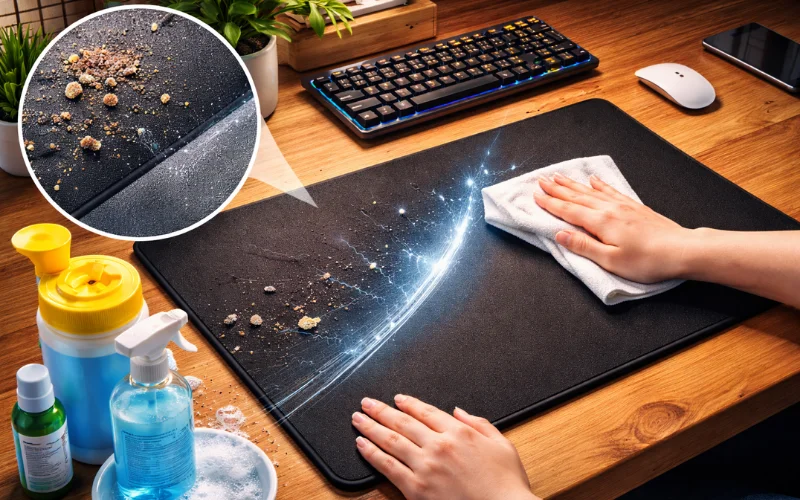
A grimy pad alters your mouse glide and reduces optical sensor accuracy. Accumulated particles create micro-friction that slows your movements and disrupts tracking. For competitive players, this degradation can be the difference between a successful headshot and a missed shot.
Hygiene and bacteria buildup
Studies show that an unmaintained mouse pad can host up to 10,000 bacteria per square centimeter - more than a toilet seat. That buildup encourages skin irritations and allergies, especially if you spend several hours a day in front of your setup.
Extending your equipment’s lifespan
Regular maintenance preserves the cloth fibers, maintains the non-slip base’s grip and prevents premature yellowing. A well-maintained pad can last 3 to 5 years, vs 12 to 18 months for a neglected one. Investing a few minutes a month saves you money long-term.
How to clean a mouse pad by material
The type of cleaning depends entirely on your pad’s composition. Here are the methods adapted to each material.
Cloth pad: the complete method
Cloth pads (textile surface on rubber base) are the most common in gaming. They need a deep clean every 1-2 months.
Equipment needed:
- Mild soap or dish soap
- Lukewarm water (not hot)
- Soft-bristle brush or soft sponge
- Clean towel
Step-by-step method:
- First remove surface dust with a vacuum or by patting the pad
- Fill a sink or basin with lukewarm water
- Add a few drops of mild soap
- Fully submerge the pad and let it soak 10 minutes
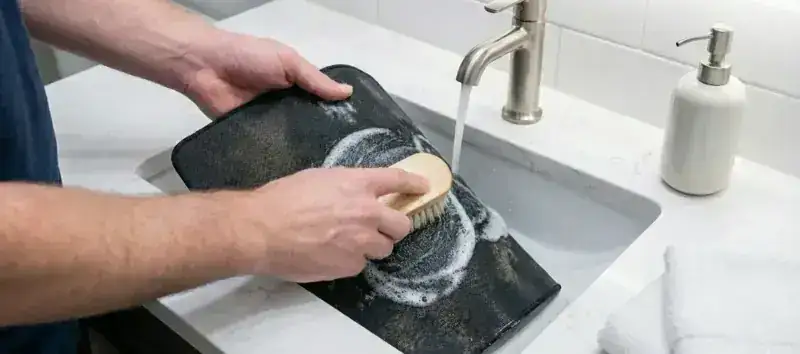
- Gently scrub the surface with the brush in circular motions
- Focus on stained areas without scrubbing too hard
- Rinse thoroughly with clean water until all foam is gone
- Gently press out water (never wring)
- Lay flat on a towel for natural drying
→ Detailed guide: How to wash a cloth mouse pad
Total time: 15 minutes cleaning + 24h drying
Hard plastic or PVC pad
Hard surfaces clean quickly but require gentleness to avoid micro-scratches that would affect glide.
Express method:
- Dust with a dry microfiber cloth
- Spray a mild multi-surface cleaner or soapy water
- Wipe with a damp microfiber cloth in linear motions
- Dry immediately with a dry cloth
- Check that no streaks remain
→ Complete tutorial: Cleaning a hard mouse pad
Total time: 5 minutes
RGB LED-lit pad
Lit pads require special attention to preserve electronic components and lighting.
Essential precautions:
- ALWAYS unplug the USB cable before cleaning
- NEVER submerge the electronic enclosure
- Avoid water on areas with embedded LEDs
- Use a slightly damp cloth, never wet
Safe method:
- Unplug and let cool 10 minutes
- Clean only the textile surface with a damp cloth
- Use a cotton swab for areas near the electronics
- Let dry completely (at least 2h) before reconnecting
- Test the lighting before intensive use
→ Specialized guide: Cleaning an RGB pad safely
Total time: 10 minutes + 2h drying
Glass or aluminum pad
These premium materials offer exceptional glide but scratch easily.
Method for premium surfaces:
- Dust with an antistatic microfiber cloth
- Spray an ammonia-free glass cleaner
- Wipe with a clean microfiber cloth in circular motions
- Polish with a second dry cloth to remove streaks
Warning: Never use abrasive products or scouring pads - they would create permanent micro-scratches.
Total time: 3 minutes
Recommended products and mistakes to avoid
Suitable, safe products
For effective, risk-free cleaning, prefer:
- Liquid Marseille soap: natural, effective, economical
- Mild dish soap: cuts grease without harming fibers
- Liquid black soap: excellent for stubborn stains
- Distilled water for rinsing: avoids white marks
- Diluted white vinegar (10%): naturally disinfects and deodorizes
The mistakes that ruin your pad
❌ NEVER do:
- Use bleach: discolors and weakens fibers
- Clean with 90° alcohol: dries out the rubber base
- Run through a washing machine (unless explicitly approved by the manufacturer)
- Use a tumble dryer: guaranteed warping of the non-slip base
- Scrub with a stiff brush: damages the surface and reduces glide
- Dry with a hairdryer: thermal warping risk
- Iron the pad: melts the rubber and synthetic fibers
These common mistakes can permanently destroy your pad in a single operation. Gentleness and patience are your best allies.
Detailed tutorial: deep cleaning an XXL pad
Large-format pads (XXL deskmat) require a specific approach because they often don’t fit in a standard sink.
Setup
- Clean your bathtub or shower
- Make sure you have enough lukewarm water
- Prep a large bath towel for drying
- Allow 30 minutes for the complete operation
Step-by-step process
Phase 1 - Pre-cleaning (5 min):
- Vacuum the pad on both sides to remove dust and crumbs
- Identify stubborn stains that will need more attention
Phase 2 - Washing (15 min):
- Spread the pad in the bathtub
- Fully wet with lukewarm water
- Apply mild soap across the entire surface
- Brush gently with a soft-bristle brush
- Focus on hand/wrist contact zones (dirtier)
- Flip and clean the rubber base too
Phase 3 - Rinsing (10 min):
- Rinse thoroughly with the showerhead
- Make sure no foam remains in the fibers
- The rinse must be complete to avoid sticky residue
Phase 4 - Drying:
- Press out water, never wring
- Spread on a large towel
- Roll the whole thing to absorb excess water
- Hang flat or on a drying rack
- Patience: 24 to 48h depending on ambient humidity
💡 BuddyPad tip: Clean your pad on the weekend so it’s dry and ready Monday morning.
Drying: best practices to avoid warping
Drying is the most critical step that conditions the lifespan of your pad.
Drying time by material
- Standard cloth pad: at least 24 hours
- Thick XXL pad: 36 to 48 hours
- Hard pad: 5 to 10 minutes
- RGB pad: at least 2 hours before reconnecting
Optimal drying method
Ideal setup:
- Ventilated room (open window or fan)
- Room temperature (20-22°C / 68-72°F)
- Pad laid flat on a towel
- Avoid direct sun which can fade colors
Speed up drying:
- Change the absorbent towel after 6h
- Flip the pad every 12h
- Use a fan from a distance (not directly on it)
- In winter, place near a radiator (never on top)
How to know when the pad is fully dry?
Touch the rubber base: that’s the part that dries last. If it’s cold to the touch or slightly damp, keep drying. A poorly dried pad will develop mold and bad smells in a few days.
→ Complete guide: Drying a mouse pad properly
Recommended maintenance frequency
Preventive maintenance is more effective than an occasional deep clean.
Maintenance schedule by use
Intensive use (daily gaming, 6+h/day):
- Weekly: quick dusting
- Monthly: deep clean
- Every 6 months: wear check and replacement if needed
Moderate use (3-5h/day):
- Bi-monthly: complete clean
- Annually: inspection and possible replacement
Occasional use (office work):
- Quarterly: sufficient cleaning
- Every 2-3 years: replacement
Signs that a clean is needed
Clean immediately if you notice:
- Visible dirt or color change
- Degraded glide feel
- Visible dust buildup
- Bad smell
- Spilled liquid stains
→ Detailed schedule: Optimal cleaning frequency
Common problems and pro solutions
My pad is sticky after cleaning
Possible causes:
- Soap residue not rinsed properly
- Wrong product used
- Rubber base altered by an aggressive product
Solution:
- Rinse again thoroughly with clean water
- Use distilled water for the final rinse
- If the problem persists, the pad may be permanently damaged
My pad has yellowed over time
Causes:
- Prolonged exposure to UV light
- Natural oxidation of white fibers
- Embedded dirt buildup
Solutions:
- Cleaning with sodium percarbonate (oxygen-based stain remover)
- Extended bath (1h) in lukewarm soapy water
- If yellowing is deep, consider replacement
Note: Yellowing is often irreversible on white pads over 2 years old.
Persistent smells despite cleaning
Causes:
- Mold developed in the thickness (incomplete drying)
- Bacteria embedded in the fibers
- Rubber base degrading
Solutions:
- Wash with diluted white vinegar (10% in water)
- Let soak 30 minutes
- Rinse thoroughly
- Dry outside if possible (natural UV disinfectants)
- If smell persists, the pad is probably compromised
→ Complete troubleshooting: Pad problems and solutions
FAQ: your questions on mouse pad cleaning
Can you wash a mouse pad in the washing machine? +
Most makers strongly advise against machine washing. The drum can warp the non-slip base and the spin cycle can unstick layers. If the maker explicitly allows it, use a delicate cycle (max 30°C / 86°F) without spinning, and place the pad in a pillowcase. At BuddyPad, we always recommend hand washing to preserve the longevity of your pads.
How often to clean a gaming pad? +
For intensive gaming use (daily), monthly cleaning is ideal. Pro players even clean their pad every week. For standard office use, every 2-3 months is enough. Adjust by environment: if you eat at your desk or your setup is in a dusty room, increase the frequency.
How to remove a coffee or soda stain from a pad? +
Act immediately: blot the liquid without rubbing, then clean the area with lukewarm soapy water. For embedded stains, mix baking soda and water into a paste, apply to the stain, let sit 30 minutes, then gently scrub and rinse. Sugary drinks leave a sticky residue if not handled quickly.
Does white vinegar damage mouse pads? +
No - diluted white vinegar (10% maximum) is safe for most cloth pads. It naturally disinfects and neutralizes smells. However, avoid using pure vinegar (too acidic) and always rinse thoroughly after use. Vinegar is not recommended for RGB pads or special hard surfaces.
My XXL pad takes 3 days to dry, is that normal? +
It’s long but not abnormal for a thick pad (4-5mm) in a poorly ventilated environment. To speed up: press out better when cleaning (press hard), change the absorbent towel multiple times, use a fan, and prefer a warm, ventilated room. In winter, drying is naturally longer. If possible, clean in summer.
Can you use a steam cleaner? +
Not recommended for most pads. Excessive heat (100°C+ / 212°F+) can melt synthetic fibers, unstick the rubber base and warp the pad. Only some thick natural-cloth pads might handle it, but the risk isn’t worth it. Manual cleaning with lukewarm water is safer and just as effective.
How to clean a white or light-colored mouse pad? +
Light pads show dirt more easily but clean the same way. To restore whiteness, add sodium percarbonate (oxygen-based stain remover) to the wash water. Avoid bleach, which yellows long-term. Wash more frequently (every 3 weeks) to prevent buildup that progressively grays the cloth.
Can RGB pads go in water? +
The textile surface can be cleaned with a damp cloth, but the electronic enclosure must NEVER be submerged. Always unplug before cleaning and let dry completely (at least 2h) before reconnecting. Water contact with the electronic components would permanently destroy your RGB pad.
My pad warps after washing, what should I do? +
Warping often comes from incorrect drying (exposed to a direct heat source or hung up). To fix: lightly wet the pad, lay it flat with heavy books on the corners for 24h, then let it dry naturally flat. If the deformation is too significant, the pad is unfortunately unrecoverable.
Should you also clean the non-slip base? +
Yes, absolutely! The base also accumulates dirt that reduces its grip. During complete cleaning, flip the pad and scrub the rubber base with the same soapy water. Rinse well and dry completely. A clean base sticks better to the desk and extends the life of your pad.