Why properly drying your mouse pad matters
A damp or wet mouse pad can quickly become unusable and encourage bacteria and mold proliferation. Many users don’t know how to properly dry their mouse pad without damaging it, which reduces its lifespan and performance. This guide explains the best methods to dry your mouse pad safely, step by step.
The risks of a damp pad
Prolonged moisture on a mouse pad leads to several harmful consequences:
- Surface coating degradation
- Moisture buildup encouraging mold and odors
- Optical or laser sensor malfunction
- Reduced responsiveness and accuracy
- Potential damage to the adhesive base
Impact on product lifespan
Moisture exposure accelerates premature wear of your equipment. Materials degrade faster, non-slip properties decrease, and aesthetics deteriorate. You’ll then be forced to replace your pad well before its planned end of life. To understand how to keep your equipment in good shape, check our complete mouse pad maintenance and cleaning guide, covering all aspects of upkeep.
Preparation before drying
Assess the moisture level
Before starting drying, identify the extent of the problem. Determine whether your pad is wet, damp or simply moist. Check the most saturated zones by lightly pressing them with your finger. Test the touch sensation to precisely evaluate moisture level. This assessment will help you choose the most appropriate drying method.
Clean before drying
Use a soft cloth to remove excess water without scrubbing vigorously, to avoid damaging the surface. Let the pad drain naturally for a few minutes over a sink or bathtub. Check that no dirt is embedded in the fibers before proceeding to complete drying.
Recommended drying methods
Air drying, the preferred method
Natural drying remains the best approach to preserve your pad’s integrity. Place it in a vertical or slightly tilted position to encourage water flow. Ensure optimal air circulation by positioning it near an open window, ideally in a place with good cross ventilation. Avoid prolonged direct sunlight, which could fade or warp the material.
This method usually requires 24 to 48 hours depending on initial moisture level. To even out drying, flip the pad halfway through. It’s a gentle approach that minimizes damage risk.
Using a fan
If you need to speed up the process, a fan can be very effective. Position it at a moderate distance from the pad and set it to medium speed to avoid damage. This method speeds up drying by 30-40 percent, bringing necessary time down to 12-24 hours. It’s ideal for poorly ventilated environments or humid periods.
Drying with a dehumidifier
For particularly sensitive materials, placing the pad in a room equipped with a dehumidifier offers a gentle, effective solution. Maintain a stable temperature between 18-25°C / 65-77°F and regularly monitor relative humidity. This method requires 18 to 36 hours but guarantees uniform drying without warping risk.
Methods to absolutely avoid
Direct heat and heat sources
Never resort to a hairdryer or radiators to speed up drying. Direct heat causes material shrinkage and can deform it irreversibly. Also avoid placing your pad in intense sun for prolonged periods. These methods risk causing permanent damage to the pad’s structure and properties.
Wringing and compression
Resist the temptation to twist or strongly press the pad to extract water. Never use a washing machine or spinner. These actions cause permanent structural deformation and can damage the pad’s internal layers, making any restoration impossible.
Closed environments
Avoid closets or spaces without ventilation, where moisture stagnates. Don’t cover the pad with plastic during drying. These conditions encourage mold development and bad smells, turning your initial problem into a sanitary disaster.
Verification and finishing
Test residual moisture
Once drying is finished, touch the pad to check it’s completely dry to the touch. Check the absence of moisture smell, which would indicate residual moisture. Particularly check the adhesive base, which must be entirely dry. If you have a hygrometer, use it to precisely measure moisture level.
Restore performance
Lightly brush the surface with a soft brush to restore texture. Check desk grip and test responsiveness with your mouse. If necessary, clean the mouse to remove any moisture residue. Your pad should regain its original performance.
Preventing future incidents
Place your pad in a dry, stable environment. Use coasters for drinks and keep it away from moisture sources. Clean it regularly to prevent moisture buildup. These simple habits considerably extend your equipment’s lifespan.
Recommended products and accessories
Moisture-resistant mouse pads
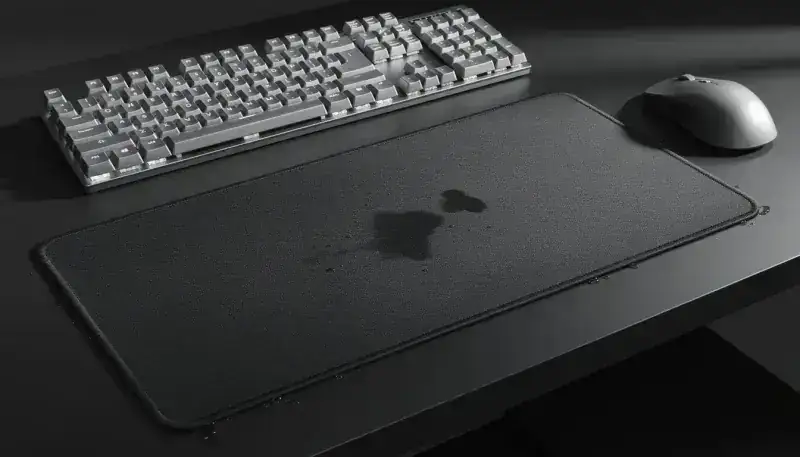
To avoid these problems in the future, invest in a higher-quality pad. BuddyPad offers a selection of mouse pads with hydrophobic coating, designed to resist moisture and offer better durability. These premium materials guarantee increased resistance to water infiltration and extended performance, compared to less durable alternatives available on the market.
Useful drying equipment
To optimize your drying process, consider getting silent desk fans, compact dehumidifiers, absorbent microfiber cloths, or vertical drying supports. These accessories considerably ease the maintenance of your gaming equipment.
Conclusion
Properly drying your mouse pad extends its lifespan and maintains optimal performance. Prefer air drying or fan drying, strictly avoid direct heat and closed environments. To avoid these recurring problems, invest in a quality pad like those offered by BuddyPad, designed to resist moisture and offer lasting protection. Check our complete mouse pad catalog to discover solutions suited to your specific needs.